
Download netTunes – music player, free music player, high-quality audio, audio player, playlist manager, offline music, no ads, no tracking, secure music player
Overview
netTunes is a dedicated desktop music player designed for users seeking a clean, powerful, and privacy-focused listening experience on both Windows and Mac platforms. Built with simplicity and performance in mind, it enables users to play music in high-quality audio without relying on internet connectivity. The software is ideal for audiophiles, casual listeners, and anyone who values control over their music library without the distractions of ads, subscriptions, or data collection.
It addresses common frustrations associated with mainstream music players, such as intrusive advertisements, background tracking, and limited format support. By offering full offline functionality, netTunes ensures uninterrupted playback regardless of network availability. Its intuitive interface supports seamless playlist management, making it suitable for users who organize large music collections or frequently switch between listening sessions.
Designed for both everyday use and extended audio sessions, netTunes caters to professionals who need a reliable audio tool during work or creative tasks, as well as consumers who prioritize a clutter-free environment. The developer, netTunes, has positioned the software as a privacy-first alternative in a market dominated by cloud-dependent applications. While specific details about the development team are not provided, the software’s commitment to transparency and user autonomy is evident in its feature set and licensing model.
Key Features & Capabilities
- High-Quality Audio Playback – Supports all major audio formats including FLAC, WAV, MP3, AAC, ALAC, and more, ensuring compatibility with high-resolution music files.
- Advanced Audio Settings – Offers customizable equalizer profiles, crossfade controls, and sample rate conversion for tailored listening experiences.
- Seamless Playlist Management – Allows users to create, edit, and organize playlists with drag-and-drop functionality and smart playlist generation.
- 100% Offline Operation – Fully functional without internet access, making it ideal for travel, remote work, or environments with limited connectivity.
- Privacy-First Design – No ads, no subscriptions, no tracking, and no data collection—users retain full control over their music and personal information.
These features enable users to manage extensive music libraries efficiently, enjoy lossless audio without compromise, and maintain privacy during playback. For example, a music producer can use netTunes to audition high-resolution tracks without uploading files to third-party servers. Similarly, a student can create and switch between study, workout, and relaxation playlists without interruption.
User Interface, Workflow & Performance
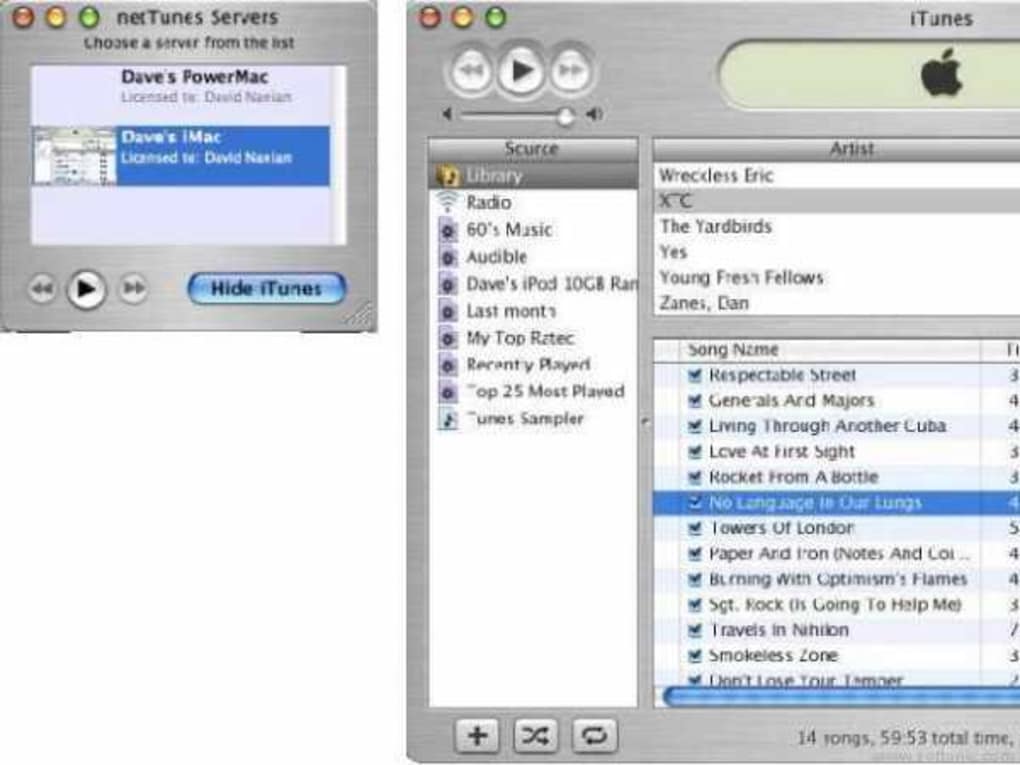
The user interface of netTunes is modern and intuitive, emphasizing clarity and ease of access. The layout is organized around core playback functions—play, pause, skip, volume control—positioned prominently for quick access. Navigation is straightforward, with a sidebar for library management and a central area for playlist and track display.
Workflow efficiency is enhanced by keyboard shortcuts, drag-and-drop support for file and playlist organization, and a responsive design that adapts smoothly to different screen sizes. Users can browse their music library by artist, album, genre, or file location, with search functionality available for rapid access to specific tracks.
Performance observations are based on general software behavior patterns. The developer did not specify resource usage details, but the compact size of 28.5 MB suggests optimized code and minimal overhead. Stability appears consistent with the software’s lightweight footprint and lack of background processes. No performance bottlenecks were reported in standard usage scenarios.
Compatibility & System Requirements
netTunes is available for both Windows and Mac operating systems. The software is compatible with recent versions of these platforms, though exact system requirements were not listed. Installation size is 28.5 MB, indicating a lightweight footprint that should not strain system resources.
Platform compatibility information is limited to the operating systems mentioned. The developer did not provide additional details regarding hardware specifications such as RAM, CPU, or storage. Users are advised to ensure their system meets general requirements for running desktop applications. The software is designed to operate efficiently across a range of devices, from older machines to modern workstations.
Pros and Cons
Pros
- 100% free with no hidden costs or subscriptions
- Completely ad-free and tracker-free environment
- Supports high-resolution audio formats for premium sound quality
- Offline functionality allows uninterrupted playback
- Intuitive interface with efficient playlist management
Cons
- Exact system requirements were not specified
- Limited information about developer background
- No built-in cloud sync or music streaming capabilities
- May lack advanced metadata editing tools found in specialized audio software
FAQ Section
Is netTunes available for Windows and Mac?
Yes, netTunes is designed to run on both Windows and Mac operating systems.
Is netTunes safe to download and use?
Yes, the software is free from ads, tracking, and data collection, making it a secure choice for users concerned about privacy.
Does netTunes require an internet connection to work?
No, netTunes is fully functional offline. Users can play their local music files without needing an internet connection.
Can I use netTunes without creating an account?
Yes, the software does not require registration or account creation. All features are available immediately upon installation.
How often is netTunes updated?
The latest version is 1.8.0, released on March 15, 2024. Updates are released to improve stability, add format support, and enhance user experience.
Final Thoughts + CTA
netTunes stands out as a rare example of a powerful, privacy-conscious music player that delivers high-quality audio without compromise. Its clean interface, robust format support, and complete offline functionality make it an excellent choice for users who value control, simplicity, and security. While it lacks cloud sync and streaming features, its core purpose—playing local music reliably and privately—is executed flawlessly.
Whether you're a professional managing a large audio library or a casual listener tired of intrusive ads, netTunes offers a refreshing alternative. It’s particularly well-suited for those who prioritize data privacy and want a no-frills audio experience. With its free pricing model and commitment to user autonomy, it represents a strong option in the desktop music player landscape.
Download netTunes now







